
8171 Check Online CNIC - BISP 14500 Payment Status Guide 2026
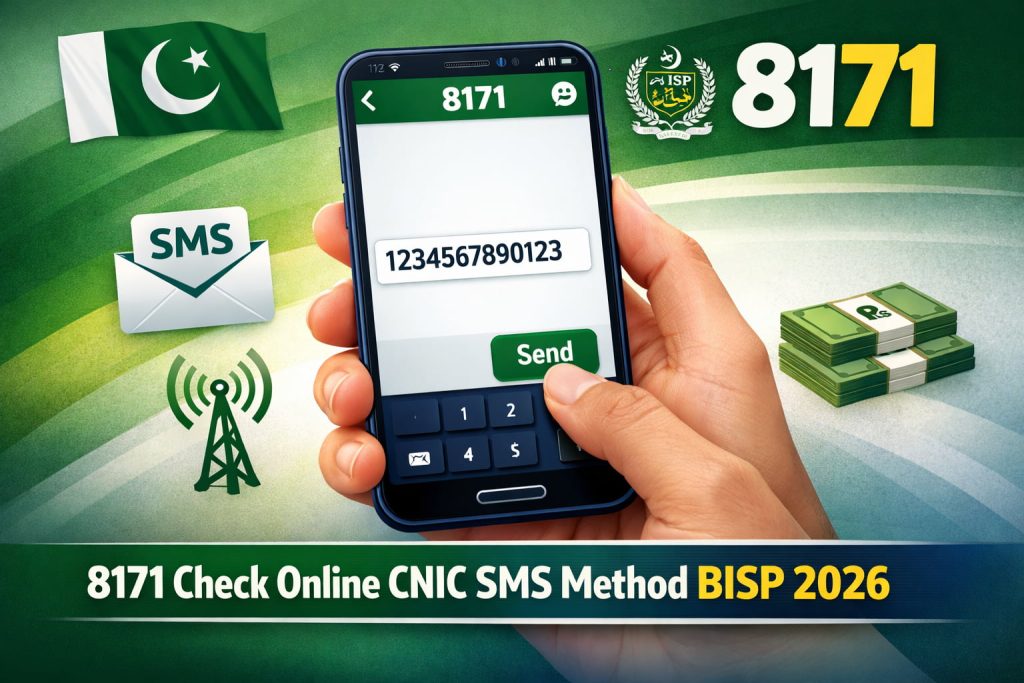
Majority of people in Pakistan face a issue on daily basis to check their CNIC if they are eligible for BISP or not and also to check their payment status for BISP.
The government has a system called 8171 check CNIC. This system is from the Benazir Income Support Programme. It helps people see if they can get the money check if their payment is coming and confirm if they got the money which is Rs. 14,500.
This guide will tell you everything, about how to check your BISP payment status. We will talk about the 8171 website, the SMS service, the login system and how to verify your information. Now you can check your BISP status without asking anyone for help. You can use the 8171 web portal or the other methods to check your BISP status and see if you got the Rs. 14,500 BISP payment.
8171 Check Online CNIC - Step by Step Guide
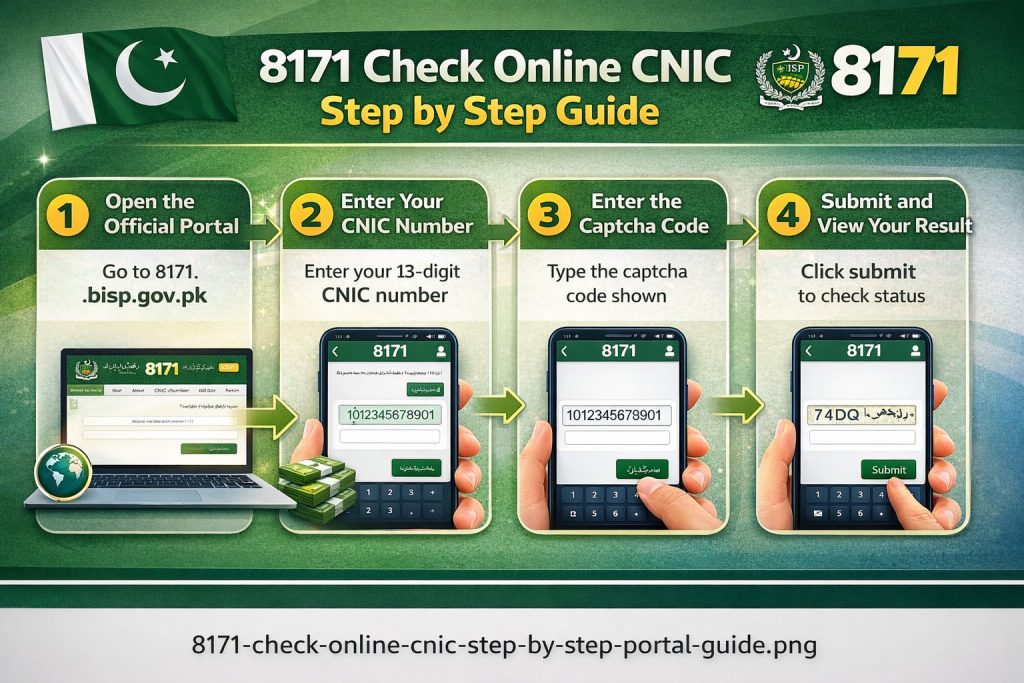
The fastest and most reliable way to check your BISP status is through the official 8171 web portal. I have explained the step by step guide to check your status by web-portal:
Method 1: Online Portal Check!
Step 1: Open the Official Portal
Open your browser and go to 8171.bisp.gov.pk. This is the only government official portal for 8171 check online CNIC.
Step 2: Enter Your CNIC Number
Enter your 13-digit CNIC number without dashes or spaces. Double check before submitting.
Step 3: Enter the Captcha Code
A captcha code will appear on the screen. Type it exactly as shown on the screen.
Step 4: Submit and View Your Result
Click submit. Your 8171 BISP result check online by CNIC will appear within seconds, showing your current eligibility status and whether your payment has been processed.
- No account will be needed.
- No fee will be charged.
- It takes less than two minutes.
8171 CNIC Check via SMS - Without Internet
For families in areas without internet access, BISP provides a free SMS based service that gives the same result as the web portal.
Steps to Follow:
- Open your mobile phone messages
- Type your 13-digit CNIC number, no dashes, no spaces
- Send it to 8171
- You will receive a reply SMS within minutes confirming your eligibility and payment status
This service works on all Pakistani networks, Jazz, Telenor, Zong, and Ufone. Standard SMS charges may apply.
8171 Check Online CNIC Login - Complete Guide
The 8171 login system allows you to access a personalized view of your BISP account status. Here is how to use it.
Login Process:
- Go to 8171.bisp.gov.pk
- Enter your CNIC number and complete the captcha
- If your CNIC is registered, your personal dashboard will appear
- You will see your eligibility status, payment history, and current installment details
What You See After Login:
- Current eligibility status, Eligible, Ineligible, Under Verification, or Survey Required
- Latest payment amount and date
- Payment collection method assigned to your account
- Any pending actions required from your side
If login is not working, check 2 to 3 times, try to clear your browser cache.
If the portal is slow, it is mostly because of high traffic during a new payment cycle, wait a few hours and try again.
BISP 8171 14500 Payment Status - Latest Update 2026
Current Payment Amount:
The standard BISP quarterly installment is Rs. 13,500. For the January to March 2026 cycle, eligible families are receiving Rs. 14,500, an increase of Rs. 1,000 from the previous cycle. In cases where previous payments were missed, families may receive up to Rs. 27,000 in a single installment. Always verify your exact payment amount through the official 8171 portal as the amount may change based on your household’s program.
Why the payment Was Increased:
The Rs. 14,500 increase was done by the government to account for inflation and to provide additional support during the Ramzan period. This increase applied to Benazir Kafalat beneficiaries. Families enrolled in Taleemi Wazaif or Nashonuma may receive different amounts based on their program.
Payment Schedule:
BISP payments are released quarterly, January to March, April to June, July to September, and October to December. The government announces each new payment phase through the official 8171 tracking portal 2026. Check 8171.bisp.gov.pk regularly or send your CNIC to 8171 via SMS to stay updated.
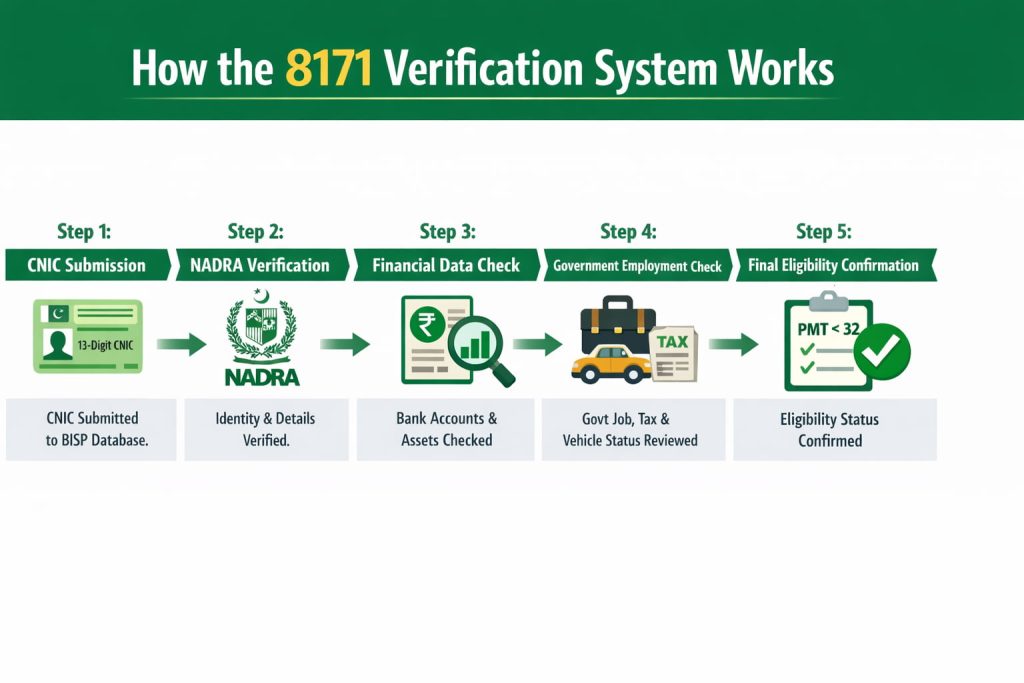
How the 8171 Verification System Works:
When you submit your CNIC on the 8171 portal, a multi-step verification process runs automatically in the background. Here is exactly what happens.
Step 1: CNIC Submission
Your 13-digits CNIC number is submitted to the BISP database. The system checks if your CNIC exists in the NADRA.
Step 2: NADRA Verification
Your CNIC goes through a verification process in NADRA’s database. This step confirms your identity, date of birth, and current address, helping to prevent any fraud.
Step 3: Data Cross-Check
Your household data from the NSER Dynamic Survey is pulled and verified. The system checks your 8171 pmt score check, household income, assets, and family size against the government poverty threshold.
Step 4: Government Employment Check
The system checks whether any family member is employed in a government position, pays income tax, or owns a registered vehicle. Any of these factors can affect eligibility.
Step 5: Final Eligibility Confirmation
After all these steps, your eligibility status is confirmed. If all checks pass and your PMT score is below 32, you are confirmed as eligible. The result is displayed on the portal in a few seconds.
How to Collect Your BISP Payment
HBL ATM
Use your BISP Benazir debit card at any HBL ATM across Pakistan. Insert your card, enter your PIN, and withdraw your payment. This is the fastest method.
HBL Bank Branch
Now visit your nearest HBL branch with your original CNIC.
The cashier will check your ID card and will process your payment.
JazzCash or EasyPaisa Retailers
Authorized JazzCash and EasyPaisa retailers can disburse your BISP payment after CNIC verification. This is especially useful in areas without near bank branches.
Social Protection Wallet, New 2026
BISP has launched a new Social Protection Wallet for eligible beneficiaries. Payments are now being transferred directly to digital wallet accounts, allowing families to access their money anytime through their mobile phone.
BISP Mobile Registration Vans
For families in remote areas who cannot travel to a Tehsil office, BISP has deployed Mobile Registration Vans across selected districts. These vans conduct door-to-door NSER surveys and biometric verification. If a van is scheduled in your area, you will receive an SMS from 8171 with the date and location.
Common Problems and Solutions
CNIC Not Found in System
Your CNIC is not yet registered in the BISP database. Visit your nearest BISP Tehsil office or wait for a Mobile Registration Van in your area to complete your NSER survey and get registered.
SMS Not Received from 8171
If you don’t receive a message it does not mean you are ineligible. Sometimes SMS delivery is delayed due to network issues. Wait 30 minutes and try again.
You can also switch your mobile to flight mode to check if there is any network issue.
If still no response, check your balance. Standard SMS rates apply. You can also check directly on the portal.
8171 Login Not Working
During peak periods when new payment cycles are announced, the portal may be slow or temporarily unavailable. Clear your browser cache, or wait a few hours and try again. The SMS method is a reliable alternative during these times.
Thumbprint Not Working at ATM or Payment Center
This is common for older people whose fingerprints are not clear. Clean your fingers with a wet cloth before trying. Use all fingers, not just the index finger. If the problem remains the same, visit your nearest BISP Tehsil office and request a manual biometric update.
Bring your original CNIC and any previous BISP payment receipts as proof so that you can show them.
Showing Ineligible Despite Being Eligible
Don’t worry! You are not permanently ineligible. Visit your nearest BISP Tehsil office with your original CNIC, request a review of your NSER data, and ask for a fresh survey if your household situation has changed. Contact the BISP helpline 0800-26477 for guidance. It is toll-free.
Frequently Asked Questions
Go to 8171.bisp.gov.pk, enter your 13-digit CNIC number, complete the captcha, and click submit. Your payment status will appear instantly. No account or fee required.
Yes, completely free. The portal charges nothing. SMS to 8171 may have standard network charges. If anyone asks you for money to check your status, that is fraud.
Usually quarterly installment is Rs. 13,500. For the January to March 2026 cycle, most eligible families are receiving Rs. 14,500, But you should always verify your amount on the official portal.
No, BISP payments are quarterly, meaning once in every three months. Rs. 14,500 is the amount for three months, not one month.
Yes, you can enter any CNIC number on the portal. But you can only collect payment using your own CNIC and biometric verification.
This usually means your PMT score is above the eligibility threshold, your NSER survey is incomplete, or a family member holds a government job. Visit your nearest BISP Tehsil office for a review.
Log in to 8171.bisp.gov.pk with your CNIC number. After the captcha, your portal will show your current balance, payment history, and the status of your latest installment.
Official BISP helpline number is 0800-26477. This is toll-free and is available from Monday to Friday during office hours.
Conclusion
This 8171 check online CNIC system is the best and most direct way for you to verify the BISP eligibility and track Rs. 14,500 payment status in 2026. Whether you use the web portal, SMS method, or the login system, the process is free, fast, and is available for everyone.
Always use the official portal at 8171.bisp.gov.pk. Don’t pay anyone to check your portal.